
Connect TikTok to Gabster
A quick walkthrough. You'll link your TikTok account so your agent can reply to your TikTok messages automatically.
No account yet? Start your free trial
What you'll need
- Your TikTok login, the account your customers message.
- A few minutes to watch the short video below first.
- TikTok connect is new; if anything goes wrong, talk to our team.
Watch first: connecting TikTok the right way
Our team's walkthrough, with tips for picking and connecting the right account. It's in Arabic; the steps below are written out too.
Starting from your Gabster dashboard
Already in the connect window from sign-up? Skip to step 4- On your computer
Sign in to your Gabster dashboard
Open the sign-in page, choose WhatsApp or email, the one you signed up with, and enter the 6-digit code we send you. You'll land in your dashboard.
- On your computer
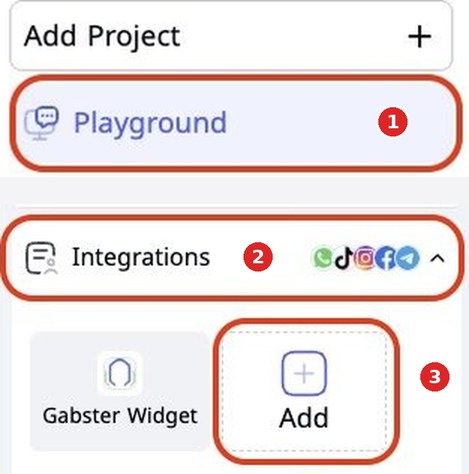
Open the Playground, then tap Add under Integrations
In the navigation menu, open Playground (1). In the side panel, find Integrations (2) and tap Add (3).
- On your computer
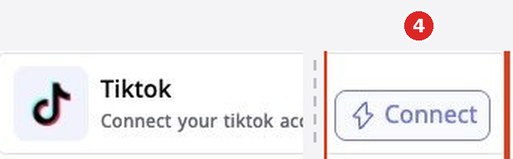
Find TikTok and tap Connect
The Integrations window lists the channels you can connect. Tap Connect next to TikTok (4): its connect window opens, and the next steps walk you through it.
Then, in the connect window
- On your computer
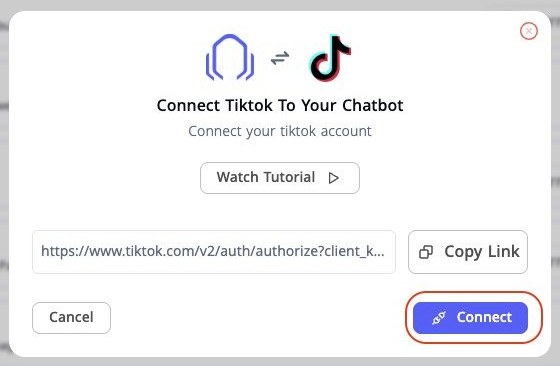
Confirm the TikTok window, then tap Connect
A “Connect Tiktok To Your Chatbot” window appears with a secure TikTok link. “Watch Tutorial” plays the video above. Tap Connect to open TikTok.
- On your computer
Sign in to TikTok, it sends you back to Gabster
TikTok opens its sign-in page. Sign in with the account your customers message you on. TikTok then sends you back to Gabster by itself, nothing else to do.
Done: TikTok is connected to your agent
Message that account from another TikTok account to watch your agent reply. From your dashboard you can review conversations, refine answers and connect other channels, depending on your plan.
Open your dashboardNo account yet? Start your free trial
Next guide: Build your own AI agent, freeNeed a hand? Talk to our team